 E-mail
Features
This component allows to expose Talend jobs as services into Petals and to execute them inside the bus.
It only acts as service provider, not as a service consumer.
This component supports jobs created with both Talend Open Studio and Talend Integration Suite.
It provides several mechanisms to pass information and data to a job.
Il also supports several mechanisms to retrieve information and data from a job.
Before going further, it must be clear that no configuration for this component is intended to be created by hand.
And neither by the Petals Studio. In fact, only Talend Open Studio and Talend Integration Suite have the ability to generate a correct configuration for this component.
However, which one of these tool created the configuration is not important for this service-engine.
The configuration by itself includes both the jbi.xml file and the WSDL describing the service.
The way it works
This section deals with the way requests are processed by the Petals-SE-Talend component.
As a user, it is important to understand the logic of the component to use it efficiently.
There are five steps in the processing of a request.
Validating the request
When a request is received and started to be processed in the Petals-SE-Talend component, it is validated before being really processed.
The following list describes the order and the conditional steps in this validation process.
- If the validate-by-wsdl parameter is set to true, either in the component or in the service-unit, then the request is validated against the WSDL's schemas of the service-unit.
- If the validation fails, a fault is raised.
- Be careful, WSDL-based validation does not work when the input message contains attachments. The Talend export for Petals does prevent that from happening.
- Be careful, the current implementation of this feature makes disk access, thus reducing the performances.
- Then, there is a check made with respect to the singleton property of a job.
If a job is singleton, it means that only one instance of this job can be executed at once. One typical example of a singleton job is a job which moves data from one database to another. It would make no sense for two instances of this job tor un at the same time, especially if they work on the same databases.
If the job is singleton and already running, then a fault is raised.
Otherwise, a new job instance is created. If the job is singleton, then the running state of this job is set to true and locked until it is this state is released (the job is executed).
Once accepted, the request can now be parsed to prepare the job's input.
Preparing the job's input
Once the request has been accepted, it is parsed to get the different possible parameters for a job.
The message input contains up to 4 parts, that are desribed in the serivce's WSDL.
- The first parameters are the context parameters, child elements of the contexts element from the input message. These parameters will be passed to the job in its main method.
- Then, the data flow to be passed to a tPetalsIOnput instance is retrieved from the request.
- The third kind of parameters is the input attachments.
- Each input attachments is serialized as a temporary file.
- Its location will be passed to the job through a context variable. This is why attachments are associated with context variables.
- Be careful, attachments are expected to be passed in MTOM mode. That is to say the attachment element has a grand-child element "xop:include" whose href attribute references an attachment.
- Besides, the name of the attachment element is the name of the context variable that will be associated with the temporary file location.
As a user, you do not have to worry about this complexity. The configuration and the WSDL creation are made by the tools, during the export.
And the clients can be generated automatically from the WSDL.
- Eventually, the component processes the native options to be passed to the job.
From one JBI message (an XML payload and attachments), the Petals-SE-Talend component gets at most 4 kind of parameters to pass to the jobs.
Three of them are merged together, since they are passed as contexts to the job. The remaining one concerns the tPetalsInput data.
Notice that the input message may not define any of these parameters. In this case, the component will pass nothing to the job.
In fact, the WSDL content and the expected parameters depend on the job's content and on the defined options during the export operation.
Executing the job
At this point, the Petals-SE-Talend has built the job instance and prepared its parameter.
If the job contains a tPetalsInput component, the data for this component is passed to the job.
The Talend contexts and options are then passed to the job and it is executed.
Getting the job's output
The job's output is an array of array of String.
This result can contain only an integer, indicating the result of the job execution, or raw data (if the job has a tBufferOutput).
This is a way to determine whether the job execution succedded or not. The Petals-SE-Talend does not do it. It is the responsibility of the client to make this check (since in fact, it depends on the job itself).
If the job contained a tPetalsOutput, then the output data flow is retreived from the job.
Eventually, if it was specified during the job export that output attachments are to be expected after the job was executed, then they are taken back from the job.
These attachments must be passed from the job to the component through files. These files are then loaded by the component in memory and then, deleted from the disk.
The deletion of these files is not an option. Letting them on the disk could represent important risks. Indeed, a malicious client could override the context on each call, thus creating an infinite number of files on the disk. Unfinite until the disk crashes, obviously.
Like input attachments, output attachments are returned in MTOM mode.
Building the response
Now that everything has been gathered from the job, the response can be built and returned.
Hence, the response can count up to 3 parts:
- The job's result (String[][]). This part is always returned.
- The output data beans, if the job contained a tPetalsOutput.
- The output attachments.
Like the input message, the structure of the output message is determined by the job content and the options which were checked during the export of the job for Petals.
Notes
The job creation strategy is a lazy strategy. A job instance is created on every received and validated message.
The consequence for singleton jobs is that all the messages sent to a singleton job while it is running will be rejected.
If a job does not support to be passed data flow (for a tPetalsInput) or asked data flow (for a tPetalsOutput), an entry is logged, but no fault is raised. The execution goes on normally.
If a component expects output attachments to be returned by the job, and that this job does not support it, then a fault is thrown. This can typically happen if you created your job with Talend Open Studio and exported a context as an "OUT-Attachment".
Talend Open Studio vs. Talend Integration Suite
Two products can be used to create Talend jobs and export them into Petals: Talend Open Studio, which is an open source product, and Talend Integration Suite, which is the upgraded version of Talend Open Studio (but not free).
There are slight differences between what can be made in these two products.
Talend Open Studio
Talend Open Studio does not support any specific component for Petals.
It supports the following features for the Petals-SE-Component:
- Expose a context as a parameter into the service's WSDL.
- Pass attachment files to a job.
- Pass native parameters to a job.
- Get the job's execution result.
Other features are only supported by Talend Integration Suite.
However, it is possible to use alternative ways, depending on the missing features.
Talend Integration Suite
In Talend Integration Suite, all the features of Talend Open Studio are supported. In fact, there are more.
- You can use tPetalsInput and tPetalsOutput components in your jobs.
- These components respectively allow you to pass data from Petals to the job and from the job to Petals.
- These two components do not have any specific parameters. They just need their schema to be defined.
- You can simulate the Petals behavior for these two components, meaning you can execute your job in Talend Integration Suite if it contains a tPetalsInput or a tPetalsOutput component.
- Thus, for a tPetalsInput, you can provide what would be the Petals input from a file that will be loaded before the simulation.
- For the tPetalsOutput, the returned document will be printed into the console.
- Eventually, Talend Integration Suite allows to attach files in the responses.
The Talend export for Petals
The export is the same in both Talend Open Studio and Talend Integration Suite.
The generated artifacts are the same in both of them. The content of the jbi.xml is the same in both of them.
The only differences are the job's content (which Talend components) and the generated WSDL (which depend on the job content and the export options).
The service-unit structure and the jbi.xml are desribed farther.
This section only introduces the export options, their impact on the result, while the next section describes the generated WSDL.
Here is a snapshot version of the Talend export for Petals.
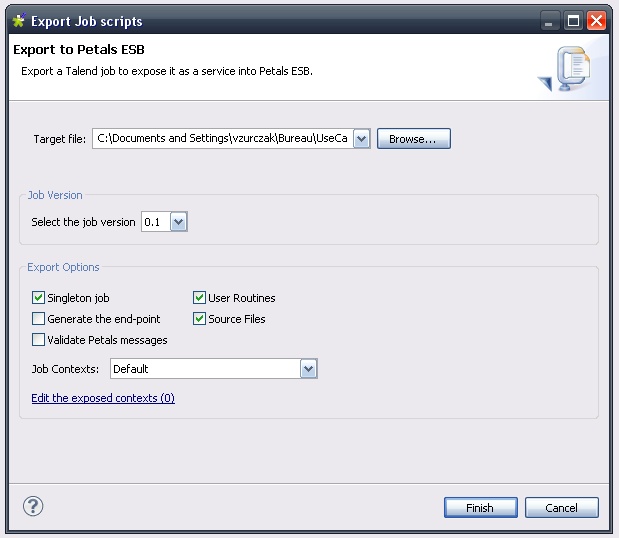
The target file is the location of the service-assembly to generate.
The job version meaning is explicit.
The export options are the following:
- Singleton job: true to make the job singleton. A singleton job can have only one instance running at once on a given Petals-SE-Talend component.
- Generate the end-point: true to let Petals generate the end-point at deployment time. If false, the end-point name is the job name with the suffix "Endpoint".
- Validate Petals messages: true to validate all the messages / requests against the WSDL.
- User routines: embed the user routines in the service-unit.
- Source files: true to embed the source files in the generated service-unit.
- Jobs contexts: select the context that will be used by default by the job.
Eventually, there is the edition link to specify how contexts should be exposed in the.generated WSDL.
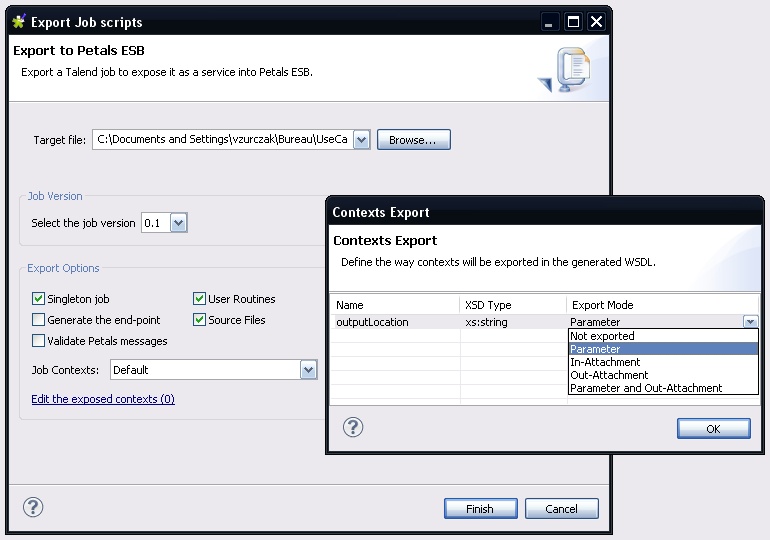
When this lin is clicked, a dialog shows up.
It lists all the job contexts, with their name, the type they will be associated with if exported, and the way they are exported.
By default, no context is exported. Said differently, the eport mode of all the contexts is NOT_EXPORTED.
Here is a small description of the export modes.
- Not exported: the context is not exported (not visible as a parameter). But the context can still be overridden using the native parameters of the job.
- Parameter: the context is exported as a parameter in the contexts.
- In-Attachment: the context will be passed the location of a temporary file whose content was passed as an attachment in the input message.
- Out-Attachment: the context will be read after the job was executed.
- This context must point to a file.
- The file content will be read by the Petals-SE-Talend component and put as an attachment into the response.
- The context name will be used as the attachment name.
- The file will be deleted by the component right after its content was loaded.
- Parameter and Out-Attachment: a mix between the Parameter and the Öut-Attachement modes.
- The context is exposed as a parameter.
- It will also be read after the job execution.
- The file will be deleted anyway.
- The advantage of this export mode if to insert more dynamicity in the output file.
The WSDL structure for Talend service-units
Component Configuration
The component can be configured through its JBI descriptor file, as shown below.
<?xml version="1.0" encoding="UTF-8"?>
<jbi:jbi
    version="1.0"
    xmlns:xsi="http://www.w3.org/2001/XMLSchema-instance"
    xmlns:petalsCDK="http://petals.ow2.org/components/extensions/version-5"
    xmlns:jbi="http://java.sun.com/xml/ns/jbi"
    xmlns:talend="http://petals.ow2.org/components/talend/version-1">

    <jbi:component type="service-engine">

        <jbi:identification>
            <jbi:name>petals-se-talend</jbi:name>
            <jbi:description>A service engine to expose and run Talend jobs as services in Petals</jbi:description>
        </jbi:identification>

        <jbi:component-class-name>org.ow2.petals.se.talend.TalendSe</jbi:component-class-name>
        <jbi:component-class-path>
            <jbi:path-element/>
        </jbi:component-class-path>

        <jbi:bootstrap-class-name>org.ow2.petals.component.framework.DefaultBootstrap</jbi:bootstrap-class-name>
        <jbi:bootstrap-class-path>
            <jbi:path-element />
        </jbi:bootstrap-class-path>

        <!-- CDK specific fields -->
        <petalsCDK:acceptor-pool-size>5</petalsCDK:acceptor-pool-size>
        <petalsCDK:processor-pool-size>10</petalsCDK:processor-pool-size>
        <petalsCDK:ignored-status>DONE_AND_ERROR_IGNORED</petalsCDK:ignored-status>
        <petalsCDK:jbi-listener-class-name>org.ow2.petals.se.talend.TalendJBIListener</petalsCDK:jbi-listener-class-name>

        <!-- Component specific configuration -->
        <!--
            The WSDL-based validation for exchanges checks that the called operation,
            the MEP and the input message are valid with respect to the WSDL.

            This property is also available for service-units.
            Enabling this property in the component enables it for all the service-units
            deployed on this component and overrides their configurations.

            When set to false, the service-unit property is used.

            Set this property to true to enable it, false to disable it.
            This property is optional. Default is false.
            Beware, performances are impacted if this property is enabled.
         -->
        <talend:validate-exchange-by-wsdl>false</talend:validate-exchange-by-wsdl>

    </jbi:component>
</jbi:jbi>
The component configuration includes the configuration of the CDK. The following parameters correspond to the CDK configuration.
This component also has one specific configuration parameter.
| Parameter | Description | Default | Required |
|---|---|---|---|
| validate-exchange-by-wsdl | True to validate the received messages with respect to the WSDL's schemas of the target service. This parameter is also available in the configuration of the service-units. Setting it in the component enables it for all the service-units deployed on this component. It also overrides the service-unit configuration for this parameter. Beware, for the moment, WSDL-based validation does not work with messages having attachments. |
false | false |
 | The Petals-SE-Talend component can only handle messages coming from inside the bus. Therefore, you cannot specify an external-listener class-name. |
Service Configuration
Execute a Talend job when a message is received
When a JBI message is received on an endpoint linked to a Talend job, the following actions are performed by the component:
- If the validate-by-wsdl action is enabled in the component or in the service-unit, then the message is validated with respect to the service's WSDL.
- If the job is not singleton, or if it is not already running, the a new job instance is created.
- If the running state could not be acquired, then a fault is thrown.
- If the job is singleton, then no other request to this service will be accepted until it was executed.
- The exported contexts are searched into the received message. They will be passed to the job when its main method is called.
- Data flow intended for a tPetalsInput component are retrieved from the JBI message.
- The input attachments are searched. Input attachments are referenced in the JBI message, while the attachments themselves are attached to this message.
- Every attachment is serialized as a tempoary file.
- The file location will be passed as a context variable to the job.
- Eventually, the Talend's options are processed. These parameters are the native parameters of a Talend job.
- The
Unable to render embedded object: File (petals-bc-ejb.png) not found.
The RMI message is created following these steps :
- The JBI message payload is mapped to Java objects. These objects (and their types) are used as operation parameters for the RMI call. The mapping is done thanks to the PEtALS-JAXB-Databinding library. For more information about XML databinding feel free to read the chapter entitled XML to Java binding.
- The JBI message exchange operation local part is used as the EJB method to invoke.
- If a security subject is provided by the JBI message it is used as authentication information during the RMI invokation.
 | For more information about JAAS read the chapter : JAAS authentication for EJB calls |
In order to reach the remote EJB, the component need to get an RMI stub of the EJB from a JNDI server. The JNDI name of the target EJB is defined in the parameter ejb.jndi.name.
The external EJB is called and the response is processed by the PEtALS-JAXB-Databinding library and then returned to the JBI environment.
Service Unit descriptor
The Service Unit descriptor file ( jbi.xml ) looks like this :
<?xml version="1.0" encoding="UTF-8"?>

<!--
  JBI descriptor for the PEtALS' "petals-bc-ejb" component (EJB).
  Originally created for the version 1.1 of the component.
-->

<jbi:jbi version="1.0"
    xmlns:ejb="http://petals.ow2.org/components/ejb/version-1.1"
    xmlns:generatedNs="http://application.localisation.watersupply.petals.ow2.org/"
    xmlns:jbi="http://java.sun.com/xml/ns/jbi"
    xmlns:petalsCDK="http://petals.ow2.org/components/extensions/version-4.0"
    xmlns:xsi="http://www.w3.org/2001/XMLSchema-instance">

  <!-- Import a Service into PEtALS or Expose a PEtALS Service => use a BC. -->
  <jbi:services binding-component="true">

    <!-- Import a Service into PEtALS => provides a Service. -->
    <jbi:provides
        interface-name="generatedNs:LocalisationFinderBusinessServicePortType"
        service-name="generatedNs:LocalisationFinderBusinessService"
        endpoint-name="LocalisationFinderBusinessServiceEndpoint">

      <!-- CDK specific elements -->
      <petalsCDK:wsdl>Localisation.wsdl</petalsCDK:wsdl>

      <!-- Component specific elements -->
      <ejb:ejb.jndi.name>LocalisationFinderBusinessService</ejb:ejb.jndi.name>
      <ejb:java.naming.factory.initial>org.jnp.interfaces.NamingContextFactory</ejb:java.naming.factory.initial>
      <ejb:java.naming.provider.url>jnp://localhost:1099/</ejb:java.naming.provider.url>
      <ejb:ejb.version>2.1</ejb:ejb.version>
      <ejb:ejb.home.interface>org.ow2.petals.watersupply.localisation.application.LocalisationFinderBusinessServiceRemoteHome</ejb:ejb.home.interface>
      <ejb:marshalling.engine>jaxb</ejb:marshalling.engine>
      <ejb:security.name />
      <ejb:security.principal />
      <ejb:security.credencials />

    </jbi:provides>
  </jbi:services>
</jbi:jbi>
Configuration of a Service Unit to expose an EJB onto Petals ESB :
| Parameter | Description | Default | Required |
|---|---|---|---|
| ejb.jndi.name | The JNDI name of the targeted EJB | - | Yes |
| java.naming.factory.initial | The name of the targeted JNDI Initial Context Factory | - | Yes |
| java.naming.provider.url | The URL of the targeted JNDI service | - | Yes |
| ejb.version | Implemention version of the targeted EJB. Supported versions are 2.0, 2.1, 3.0 and 3.1 |
- | Yes |
| ejb.home.interface | Fully qualified name of the targeted EJB Home Interface. Used only with ejb 2.0 and 2.1. Fully qualified name of the targeted EJB Home Interface. Used only with ejb 2.0 and 2.1. |
- | No |
| security.name | Fully qualified name of the security module used. | - | No |
| security.principal | Username | - | No |
| security.credencials | Password | - | No |
| marshalling.engine | The marshalling engine to use | jaxb | Yes |
| Parameter | Description |
Default |
Required |
|---|---|---|---|
| provides | Describe the JBI service that will be exposed into the JBI bus. Interface (QName), Service (QName) and Endpoint (String) attributes are required. | - | Yes |
Service Unit content
The service unit must contain a JAR archive including the EJB Interface (and EJB Home Interface for a 2.x EJB) and all specific Java classes used by this interface.
It is also highly recommended to provide a WSDL description of your EJB interface. This WSDL description will be used as Service Description for the JBI Endpoint linked to your EJB.
The directory structure of a SU for the BC-EJB must look like this :
my-su-ejb.zip
   + META-INF
     - jbi.xml
   - my-ejb-wsdl-description.wsdl
   - my-ejb.jar
   - my-ejb-dependency1.jar
   - my-ejb-dependency2.jar


h2. Provider restrictions


h2. Provider usage