 E-mail
IntroductionNagios is a complete infrastructure monitoring solution. Get more details about Nagios. The integration of Petals ESB and Nagios is based on getting information about the JVM. This is done using SNMP probes.
Nagios screenshots extract samples
|
Table of contents Contributors No contributors found for: authors on selected page(s) |

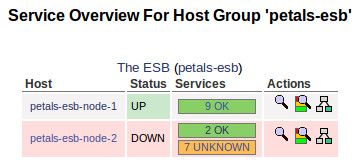
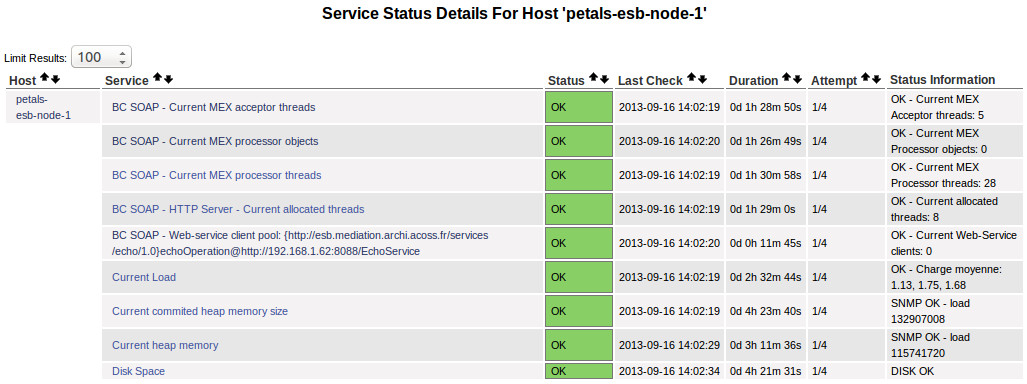
InstallationNagios installationThe Nagios integration was experienced on a Linux distribution "Ubuntu Maverick Meerkat (10.10)". Nagios 3 is available through the default Ubuntu repository. So, just install the package "nagios3" using the standard way. Enabling the SNMP agents of the Petals ESB JVMsAs the monitoring tools can use SNMP probes to get information from the JVM running Petals ESB, we need to enable the SNMP agent of the JVM of each Petals ESB node. On each Petals node, in the environment configuration file, uncomment the system properties relative to the SNMP agent: # Uncomment following lines to enable SNMP agent of the JVM PETALS_JAVA_OPTS="$PETALS_JAVA_OPTS -Dcom.sun.management.snmp.port=16161" PETALS_JAVA_OPTS="$PETALS_JAVA_OPTS -Dcom.sun.management.snmp.interface=0.0.0.0" PETALS_JAVA_OPTS="$PETALS_JAVA_OPTS -Dcom.sun.management.snmp.acl.file=/etc/petals-esb/default-snmp.acl" Adjust your SNMP port, interface and ACL.
Nagios configurationJVM host templateA best practice to monitor Java application is to create a template 'JVM host'. According to our environment defined above, create the file 'jvm-host-nagios2.cfg' in the directory '/etc/nagios3/conf.d' with the following content: define host{
use generic-host
name jvm-host ; The name of this host template
notifications_enabled 1 ; Host notifications are enabled
event_handler_enabled 1 ; Host event handler is enabled
flap_detection_enabled 1 ; Flap detection is enabled
failure_prediction_enabled 1 ; Failure prediction is enabled
process_perf_data 1 ; Process performance data
retain_status_information 1 ; Retain status information across program restarts
retain_nonstatus_information 1 ; Retain non-status information across program restarts
check_command check-host-alive
max_check_attempts 10
notification_interval 0
notification_period 24x7
notification_options d,u,r
contact_groups admins
register 0 ; DONT REGISTER THIS DEFINITION - ITS NOT A REAL HOST, JUST A TEMPLATE!
# Specific attributes
_snmp_port 161 ; Listening port of the JVM SNMP agent
}
Nagios commands definition to interact with a SNMP agentWe recommand to define specific Nagios command to interact with the Java virtual machine MIB. Interresting commands will be:
According to our environment defined above, create the file 'jvm.cfg' in the directory '/etc/nagios-plugins/config' with the following content: # 'jvm_heapused' command definition
define command{
command_name jvm_heapused
command_line /usr/lib/nagios/plugins/check_snmp -H '$HOSTADDRESS$' -p '$_HOSTSNMPPORT$' -C '$ARG1$' -P '$ARG2$' -o 1.3.6.1.4.1.42.2.145.3.163.1.1.2.11.0 -w :'$ARG3$' -c :'$ARG4$' -l load
}
# 'jvm_heapmaxused' command definition
define command{
command_name jvm_heapmaxused
command_line /usr/lib/nagios/plugins/check_snmp -H '$HOSTADDRESS$' -p '$_HOSTSNMPPORT$' -C '$ARG1$' -P '$ARG2$' -o 1.3.6.1.4.1.42.2.145.3.163.1.1.2.12.0 -w :'$ARG3$' -c :'$ARG4$' -l load
}
Petals ESB host templateA best practice to monitor Petals ESB nodes is to create a template 'Petals ESB host' that inherites from the 'JVM host'. According to our environment defined above, create the file 'petals-esb-host-nagios2.cfg' in the directory '/etc/nagios3/conf.d' with the following content: define host{
use jvm-host
name petals-esb-host ; The name of this host template
notifications_enabled 1 ; Host notifications are enabled
event_handler_enabled 1 ; Host event handler is enabled
flap_detection_enabled 1 ; Flap detection is enabled
failure_prediction_enabled 1 ; Failure prediction is enabled
process_perf_data 1 ; Process performance data
retain_status_information 1 ; Retain status information across program restarts
retain_nonstatus_information 1 ; Retain non-status information across program restarts
check_command check-host-alive
max_check_attempts 10
notification_interval 0
notification_period 24x7
notification_options d,u,r
contact_groups admins
register 0 ; DONT REGISTER THIS DEFINITION - ITS NOT A REAL HOST, JUST A TEMPLATE!
# Specific attributes
_snmpport 161 ; Listening port of the JVM SNMP agent
}
Defining your Petals ESB hostsFor each Petals ESB node of your Petals ESB topology, create an instance of the template 'petals-esb-host'. According to our environment defined above, create the file 'petals-esb-host-node1.cfg' in the directory '/etc/nagios3/conf.d' with the following content: define host{
use petals-esb-host ; Name of host template to use
host_name petals-esb-node-1
alias Petals ESB Node 1
address 127.0.0.1
_snmpport 16161 ; This value should be set with the SNMP
; agent listener port of your Petals ESB node.
}
and create the file 'petals-esb-host-node2.cfg' in the directory '/etc/nagios3/conf.d' with the following content: define host{
use petals-esb-host ; Name of host template to use
host_name petals-esb-node-2
alias Petals ESB Node 2
address 127.0.0.1
_snmpport 16162 ; This value should be set with the SNMP
; agent listener port of your Petals ESB node.
}
Defining your Petals ESB topology as a Petals ESB host groupThe Petals ESB topology can be considered as a Nagios host group composed of your Petals ESB nodes. So, according to our environment defined above, create the file 'petals-esb-hostgroup.cfg' in the directory '/etc/nagios3/conf.d' with the following content: define hostgroup {
hostgroup_name petals-esb
alias Petals ESB
members petals-esb-node-1, petals-esb-node-2
}
Petals ESB host servicesA best practice to monitor Petals ESB nodes is to create a template of services to associate to each Petals ESB nodes. According to our environement defined above, create the file 'petals-esb-services.cfg' in the directory '/etc/nagios3/conf.d' with the following content: # Define a service to check the disk space of the root partition# Define a service to check the disk space of the root partition # on the local machine. Warning if < 20% free, critical if # < 10% free space on partition. define service{ use generic-service hostgroup_name petals-esb service_description Disk Space check_command check_all_disks!20%!10% } # Define a service to check the load on the local machine. define service{ use generic-service hostgroup_name petals-esb service_description Current Load check_command check_load!5.0!4.0!3.0!10.0!6.0!4.0 } # Define a service to check the heap memory used by Petals ESB node. # Warning if > 85% configured max heap size, critical if 95% configured # max heap size. # Note: The value returned by the SNMP Get is a byte value. So, for # a max heap size of 1Go: # 85% => 912680550 bytes, # and 95% => 1020054733 bytes define service{ use generic-service hostgroup_name petals-esb service_description Current heap memory check_command jvm_heapused!public!2c!912680550!1020054732 } # Define a service to check the max (commited) heap memory used by Petals ESB node. # Warning if > Warning if > 85% configured max heap size, critical if 95% configured # max heap size. # Note: The value returned by the SNMP Get is a byte value. So, for # a max heap size of 1Go: # 85% => 912680550 bytes, # and 95% => 1020054733 bytes define service{ use generic-service hostgroup_name petals-esb service_description Current commited heap memory size check_command jvm_heapmaxused!public!2c!912680550!1020054732 } Restart NagiosRestart your Nagios service to take into account the configuration. |

