 E-mail
PEtALS-BC-FILETRANSFER
The FileTransfer component is a Binding Component (BC) which supports file transfers. This component allows to :
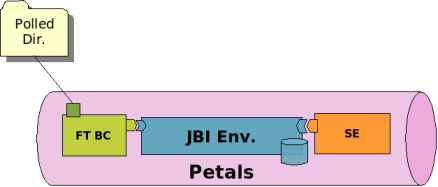
• Poll a configured directory for incoming files. At a poll, each file retrieved is put into a new JBI message, set as source or attachment. The message is sent to a target JBI service.
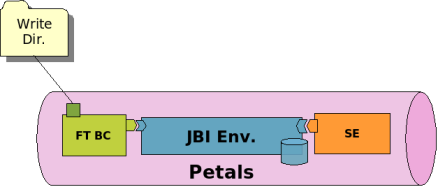
• Provide a standard service that write the JBI message (content and attachments) it receives into a file with a specified name and suffixed with the current date name.
• Provide a dedicated service GetFiles, which describe 2 operations:
getFiles operation, to retrieve files correponding to a pattern, from a folder
getFile operation, to retrieve the first file correponding to a pattern, from a folder.
These operations are described in an embedded astract WSDL, the File Transfer dedicated WSDL.
Chapter 1. Component Configuration
no specific configuration for this component
Table 1.1. Configuration of the component (CDK)
ParameterDescriptionDefault RequiredScope
acceptor-pool-size The size of the thread pool used to accept Message Exchange from the NMR. Once a message is accepted, its processing is delegated to the processor pool thread.
processor-pool-size The size of the thread pool used to process Message Exchanges.
Once a message is accepted, its processing is delegated to one of the thread of this pool.
5YesRuntime
10YesRuntime
performance- notifications
Enable the performance notifications in the component. The CDK proposes to a performance notification feature to the component implementor. If you enable this feature, you must use the related method accessible in the AbstractComponent class.
-NoRuntime
performance-stepWhen the performance notification feature is enabled, it is possible to define a step on the notifications. When there is an heavy message traffic, it is recommanded to increase this step to avoid performance disturbance.
properties-fileName of the file containing properties used as reference by other parameters. Parameters reference the property name in the following pattern ${myPropertyName}. At runtime, the expression is replaced by the value of the property.
The value of this parameter is :
• an URL
• a file relative to the PEtALS installation path
-NoRuntime
-NoInstallation
• an empty value to stipulate a non-using file
ignored-statusWhen the component receives an acknowledgement mDeOsNsEa_gAeND_ERROR_IGNOYREesD
exchange, it can skip the processing of these message according to the type of the acknowledgment. If you decide to not ignore some acknowledgement, the component listeners must take care of them.
Component
jbi-listener- class-name
Accepted values : DONE_AND_ERROR_IGNORED, DONE_IGNORED,
ERROR_IGNORED or NOTHING_IGNORED
Qualified name of the class extending AbstractJBIListener -YesComponent
external-listener- class-name
Qualifiednameoftheclassextending
AbstractExternalListener
-NoComponent
Definition of CDK parameter scope :
• Component : The parameter has been defined during the development of the component. A user of the component can not change its value.
• Installation: The parameter can be set during the installation of the component, by using the installation MBean (see JBI specifications for details about the installation sequence). If the parameter is optional and has not been defined during the development of the component, it is not available at installation time.
• Runtime : The paramater can be set during the installation of the component and during runtime. The runtime configuration can be changed using the CDK custom MBean named RuntimeConfiguration. If the parameter is optional and has not been defined during the development of the component, it is not available at installation and runtime times.
Chapter 2. Service Configuration
2.1. Transfer files into the JBI bus
CONSUME SERVICE : Transfer file(s) from a directory to a JBI service
Figure 2.1. Consumes a JBI service on polled file(s)
2.1.1. Service Unit descriptor
<?xml version="1.0" encoding="UTF-8"?>
<jbi:jbi version="1.0"[ |http://www.w3.org/2001/XMLSchema-instance ]xmlns:xsi="http://www.w3.org/2001/XMLSchema-instance"[ |http://java.sun.com/xml/ns/jbi ]xmlns:jbi="http://java.sun.com/xml/ns/jbi"[ |http://petals.ow2.org/components/extensions/version-4.0 ]xmlns:petalsCDK="http://petals.ow2.org/components/extensions/version-4.0"[ |http://petals.ow2.org/components/filetransfer/version-2.2 ]xmlns:filetransfer="http://petals.ow2.org/components/filetransfer/version-2.2"[ |http://petals.ow2.org/filetransfer ]xmlns:generatedNs="http://petals.ow2.org/filetransfer">
<jbi:services binding-component="false">
<jbi:consumes
interface-name="generatedNs:FileRepo" service-name="generatedNs:FileRepoService" endpoint-name="getServiceEndpoint">
<!-- CDK specific fields -->
<petalsCDK:operation>test</petalsCDK:operation>
<petalsCDK:mep>InOnly</petalsCDK:mep>
<!-- FileTransfer specific fields -->
<filetransfer:read-directory>${PETALS_HOME}/filetransfer/in</filetransfer:read-directory>
<filetransfer:backup-directory>${PETALS_HOME}/filetransfer/backup</filetransfer:backup-directory>
<filetransfer:transfer-mode>content</filetransfer:transfer-mode>
<filetransfer:polling-period>1000</filetransfer:polling-period>
</jbi:consumes>
</jbi:services>
</jbi:jbi>
Table 2.1. Configuration of a Service Unit to consume a service (JBI)
ParameterDescriptionDefaultRequired
consumes Name of the JBI service to invoke into the JBI bus. You can define only the interface (qname) to let the NMR choose a matching service, or the pair service(qname) and endpoint (string) to consume the localized service.
-Yes
Table 2.2. Configuration of a Service Unit to consume a service (CDK)
ParameterDescriptionDefaultRequired
mepMessage exchange pattern abbreviation. This parameter can be user in conjunction with the method of the CDK Listeners : createMessageExchange(Extensionsextensions). This method returns a CDK Exchange corresponding to the type of the specified pattern.
Admitted values are : InOnly, RobustInOnly, InOptionalOut et InOut
operationOperation to call on a service. This parameter can be used in conjunction with the sending methods of the Listeners. If no operation is specified in the Message Exchange to send, this parameter will be used.
timeoutTimeout in milliseconds of a synchronous send. this parameter can be used in conjunction with the sendSync(Exchange exchange) method of the Listeners. Set 0 for an infinite timeout.
org.ow2.petals.messaging.consumCerh.necokacPkEtALS container document for further details.
This propety activates the bypass of acknowledgment messages destinated to this SU.
-No
-No
-No
-No
org.ow2.petals.routing.strateTgoy
beusedonlyinplatform(distributed)PEtALS
-No
distribution.Check PEtALS platform documentation for further details. Override the default routing strategy for Message Exchanges sent by this SU
org.ow2.petals.transport.compTreoss
beusedonlyinplatform(distributed)PEtALS
- No
distribution.Check PEtALS platform documentation for further details.
This property activates the compression of the messages payload when set to true.
org.ow2.petals.transport.qoTso be used only in platform (distributed) PEtALS distribution.
Check PEtALS platform documentation for further details.
This property overrides the default policy of the Quality of Service supported by PEtALS Transporter for Message Exchange sent by this SU.
-No
Table 2.3. Configuration of a Service Unit to consume a service (Filetransfer)
ParameterDescriptionDefaultRequired
read-directoryThe location of the directory to poll on files. The address must be absolute.
Environment variables are supported with the form
${myEnvVariable}.
backup-directoryThe backup directory where files are put once a transfer has been processed. The backupfilesarenever deleted by the component.
Environment variables are supported with the form
${myEnvVariable}.
polling-periodThe period between each polling in ms.
transfer-modeThe mode of transfer of the received file(s) as message payload.
Accepted values : content,
attachment.
2.1.2. Consumer restrictions
-Yes
the systemNo temporary directory
1000No
content No
The FileTransfer component supports only InOnly message exchange pattern as consumer. The FileTransfer component does not support synchronous sendings as consumer.
2.1.3. Consumer usage
If you want to invoke a service in the JBI bus with files, put the files in the configured directory (read-directory). At each configured polling period (polling-period), the component fetchs the incoming files.
For each received files and according to the transfer mode (transfer-mode), the component creates a new message exchange and attachs the file, either as source or as attachment.
If a file is put as a attachment, the name of the attachment is set to the name of the file, and in the source of the message exchange, the component put a XML structure like following:
<attached-files>
<file-name>myFileName</file-name>
<attached-files>
The resulted message exchange(s) are sent to the target endpoint.
During the transfer, if the backup directory (backup-directory) is set, the transfered file is moved into it and never deleted by the component. Otherwise the file is moved to the system temporary directory.
When deploying a service unit like in the previous code snippet, all the files put in the directory $PETALS_HOME/
filetransfer/in would be set as the payload of an invocation to the FileService service.
2.2. Transfer files out of the JBI bus
PROVIDE SERVICE : Write JBI messages XML content and attachments to directory
Figure 2.2. Provides a JBI service to write JBI messages into directory
2.2.1. Service Unit descriptor
<?xml version="1.0" encoding="UTF-8"?>
<jbi:jbi version="1.0"[ |http://www.w3.org/2001/XMLSchema-instance ]xmlns:xsi="http://www.w3.org/2001/XMLSchema-instance"[ |http://java.sun.com/xml/ns/jbi ]xmlns:jbi="http://java.sun.com/xml/ns/jbi"[ |http://petals.ow2.org/components/extensions/version-4.0 ]xmlns:petalsCDK="http://petals.ow2.org/components/extensions/version-4.0"[ |http://petals.ow2.org/components/filetransfer/version-2.2 ]xmlns:filetransfer="http://petals.ow2.org/components/filetransfer/version-2.2"[ |http://petals.ow2.org/filetransfer ]xmlns:generatedNs="http://petals.ow2.org/filetransfer">
<jbi:services binding-component="true">
<jbi:provides
interface-name="generatedNs:put" service-name="generatedNs:putService" endpoint-name="putServiceEndpoint">
<!-- WSDL file -->
<petalsCDK:wsdl xsi:nil="true" />
<!-- FileTransfer specific fields -->
<filetransfer:write-directory>${PETALS_HOME}/filetransfer/out</filetransfer:write-directory>
<filetransfer:copy-mode>content-only</filetransfer:copy-mode>
<filetransfer:file-pattern>test.xml</filetransfer:file-pattern>
</jbi:provides>
</jbi:services>
</jbi:jbi>
Table 2.4. Configuration of a Service Unit to provide a service (JBI)
ParameterDescriptionDefaultRequired
providesDescribe the JBI service that will be exposed into the JBI bus. Interface
(qname), service (qname) and endpoint (string) attributes are required.
-Yes
Table 2.5. Configuration of a Service Unit to provide a service (CDK)
ParameterDescriptionDefaultRequired
wsdlPath to the WSDL document describing services and operations exposed by the provided JBI endpoints defined in the SU.
The value of this parameter is :
• an URL
• a file relative to the root of the SU package
If not specified, a basic WSDL description is automaticaly provided by the CDK.
timeoutTimeout in milliseconds of a synchronous send. this parameter can be used in conjunction with the sendSync(Exchange exchange) method of the Listeners. Set 0 for an infinite timeout.
org.ow2.petals.messaging.provideCr.hneocakckPEtALS container document for further details.
This propety activates the bypass of acknowledgment messages destinated to this SU.
-No
-No
-No
Table 2.6. Configuration of a Service Unit to provide a service (Filetransfer)
ParameterDescriptionDefaultRequired
write-directoryThe location of the directory where to write JBI message. It must be an absolute address.
The directory MUST exists. Environment variables are
supported with the form
${myEnvVariable}.
copy-modeTransfer either the source, the attachments or both of the payload.
Possible values are content- only, attachments-only or content-and-attachments.
file-patternThe name of the file where the JBI message (the XMl content) will be written in.
The system date is appended on each created file.
2.2.2. Provider restrictions
-Yes
content-and-attachments No
The operation name,No else content.xml
The FileTransfer component only supports InOnly message exchange pattern as service provider.
2.2.3. Provider Usage
2.2.3.1. default operation
According to the configured mode (copy-mode), the XML message content, attachments or both are transfered to the target directory (write-directory).
If the received message is an XML content, the name of the created file would be either the configured file pattern
(file-pattern), the operation of the message exchange, or the default name content.xml.
If the received message contains attachments, the name of the created files would be the names of the attachments. For each file created, the system date is appended to this file name.
When deploying a service unit like in the previous code snippet, all the JBI messages received on the putService service will produce files in the ${PETALS_HOME}/filetransfer/out directory.
2.3. Retrieve files from a folder : the GetFiles service
PROVIDE SERVICE : return files from a folder as XML message or attachments
2.3.1. Service Unit descriptor
<?xml version="1.0" encoding="UTF-8"?>
<jbi:jbi version="1.0"[ |http://www.w3.org/2001/XMLSchema-instance ]xmlns:xsi="http://www.w3.org/2001/XMLSchema-instance"[ |http://java.sun.com/xml/ns/jbi ]xmlns:jbi="http://java.sun.com/xml/ns/jbi"[ |http://petals.ow2.org/components/extensions/version-4.0 ]xmlns:petalsCDK="http://petals.ow2.org/components/extensions/version-4.0"[ |http://petals.ow2.org/components/filetransfer/version-2.2 ]xmlns:filetransfer="http://petals.ow2.org/components/filetransfer/version-2.2"[ |http://petals.ow2.org/filetransfer ]xmlns:generatedNs="http://petals.ow2.org/filetransfer">
<jbi:services binding-component="true">
<jbi:provides
interface-name="gefiletransfer:GetFiles" service-name="generatedNs:myGetFilesService" endpoint-name="getFilesServiceEndpoint">
<!-- WSDL file -->
<petalsCDK:wsdl xsi:nil="true" />
<-- FileTransfer specific fields -->
<filetransfer:read-directory>${PETALS_HOME}/filetransfer</filetransfer:read-directory>
</jbi:provides>
</jbi:services>
</jbi:jbi>
Table 2.7. Configuration of a Service Unit to provide a service (JBI)
ParameterDescriptionDefaultRequired
providesDescribe the JBI service that will be exposed into the JBI bus. Interface
(qname), service (qname) and endpoint (string) attributes are required.
-Yes
Table 2.8. Configuration of a Service Unit to provide a service (CDK)
ParameterDescriptionDefaultRequired
wsdlPath to the WSDL document describing services and operations exposed by the provided JBI endpoints defined in the SU.
The value of this parameter is :
• an URL
• a file relative to the root of the SU package
If not specified, a basic WSDL description is automaticaly provided by the CDK.
timeoutTimeout in milliseconds of a synchronous send. this parameter can be used in conjunction with the sendSync(Exchange exchange) method of the Listeners. Set 0 for an infinite timeout.
org.ow2.petals.messaging.provideCr.hneocakckPEtALS container document for further details.
This propety activates the bypass of acknowledgment messages destinated to this SU.
-No
-No
-No
Table 2.9. Configuration of a Service Unit to provide the GetFiles service (Filetransfer)
ParameterDescriptionDefaultRequired
read-directoryThe directory where files will be searched when GetFiles is invoked.
Environment variables are supported with the form
${myEnvVariable}.
backup-directoryThe directory where files are moved after being read.
Environment variables are supported with the form
${myEnvVariable}.
2.3.2. Provider restrictions
-Yes
The system defaultNo temporary directory
The FileTransfer component supports only InOut or InOptionalOut message exchange pattern as service provider.
2.3.3. Provider Usage
2.3.3.1. GetFile operation
When the getFile operation is set on the incoming message exchange, the component returns the first file found in the configured directory, according to the file filter set in the XML request (the source of the IN message). The file is returned as an XML response message (OUT message),so the file MUST be an XML file!
The IN message looks like :
<q0:getFile xmlns:q0="http://petals.ow2.org/components/filetransfer/version-2.2">
<q0:filepattern>*.xml</q0:filepattern>
</q0:getFile>
The OUT message returned to the consumer contains the XML content of the first file matching the pattern, in its source:
The read file is moved to the configured backup directory (backup-directory) or in the system default temporary directory.
Unable to render embedded object: File (worddav276fe3a32bec21fca352a182a612c1e7.png) not found.
Note
This operation is defined in the File Transfer abstract WSDL. You can import this abstract WSDL and define a concret WSDL to reference in your SU. Thus the service provided is properly defined by its WSDL.
2.3.3.2. GetFiles operation
When the getFiles operation is set on the incoming message exchange, the component returns all the files file found in the configured directory (read-directory), according to the files filters set in the XML request. The files are all returned as attachments. An XML report message is returned.
The IN message looks like :
<q0:getFiles xmlns:q0="http://petals.ow2.org/components/filetransfer/version-2.2">
<q0:filepattern>*.xml</q0:filepattern>
<q0:filepattern>picture.jpg</q0:filepattern>
<q0:filepattern>document??.doc</q0:filepattern>
</q0:getFiles>
The OUT message returned to the consumer is defined as follow :
<q0:getFilesResponse xmlns:q0="http://petals.ow2.org/components/filetransfer/version-2.2">
<q0:filename>file1.xml</q0:filename>
<q0:filename>file2.xml</q0:filename>
<q0:filename>picture.jpg</q0:filename>
<q0:filename>document_1.doc</q0:filename>
<q0:filename>document_2.doc</q0:filename>
</q0:getFilesResponse>
Files are returned as attachments.
The read files are moved to the configured backup directory (backup-directory) or in the system default temporary directory.
Unable to render embedded object: File (worddav276fe3a32bec21fca352a182a612c1e7.png) not found. Note
This operation is defined in the File Transfer abstract WSDL. You can import this abstract WSDL and define a concret WSDL to reference in your SU. Thus the service provided is properly defined by its WSDL.