 E-mail
Solution
Overall solution
We want to call the operation "AddIntegers" on a service "MathOperations", using a buffer. This operation needs two integer parameters, <integer1> and <integer2>, and returns their sum.
We will send messages to an EIP pattern "Aggregator". It will bufferize all messages, until he gets a trigger message. Then it sends the whole buffer, aggregated in one single message, to the next service, EIP Splitter. It will split back the aggregated message into several messages, and send them to the next step, "AddIntegers" operation, to process all messages.
Petals Settings and Messages Flows
|
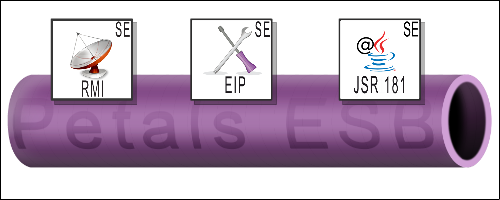
Deployed configurations:
- One Petals ESB node has:
- [SE-RMI] for sending test messages via [webconsole]
- [SE-EIP] for the buffering chain + 1
- [SE-JSR181] which contains the operation "AddIntegers" on the sample service "MathOperations"
- Then we will configure and deploy
- One Service Assembly (SA) containing two EIP Service Unit (SU) : Aggregator and Splitter patterns
- One SA containing one sample JSR181 SU: "MathOperations" with the operation "AddIntegers"
Message flows:
- From SE-RMI to SE-EIP "Aggregator"
- From SE-EIP "Aggregator" to SE-EIP "Splitter"
- From SE-EIP "Splitter" to JSR181 "MathOperations"
This usecase was tested with:
- Petals ESB 3.1, Petals-SE-EIP 2.4.3, Petals-SE-JSR181 1.1.3, Petals-SE-RMI-1.1.1, Petals webconsole 2.0.3. Configurations were generated using Petals Studio 1.1.0
Configuring the sample JSR181 Service Unit
package test.ebmwebsourcing.com;

//import javax.jws.Oneway;
import javax.jws.WebMethod;
import javax.jws.WebParam;
import javax.jws.WebResult;
import javax.jws.WebService;

/**
 * Here is a sample JAX-WS implementation.
 * <p>
 * For more information about JAX-WS, please visit
 * <b>https://jax-ws.dev.java.net/jax-ws-ea3/docs/annotations.html</b>.
 * </p>
 *
 * @author mlebreton
 */
@WebService( serviceName="MyMathOperations", targetNamespace="http://com.ebmwebsourcing.test", portName="MyMathOperationsPort" )
public class MyMathOperations {

	/* (non-Javadoc)
	 * @see JaxWSInterface#HelloWorld()
	 */
	@WebMethod( operationName="AddIntegers" ) // @WebMethod: Name of service operations that we will call
	@WebResult( name="returnMessage" ) // @WebResult: Name of the message returned by service
	public Integer AddIntegers( @WebParam( name="integer1" ) Integer integer1,  @WebParam( name="integer2" ) Integer integer2 ) { //@WebParam => Name of service parameters
		Integer result;
		result = integer1+integer2;
		return result;
	}; // Returns the sum of two integers
}
The following files can be generated by the Petals Studio.package test.ebmwebsourcing.com;
<?xml version="1.0" encoding="UTF-8" standalone="yes"?>
<xs:schema version="1.0" targetNamespace="http://com.ebmwebsourcing.test" xmlns:tns="http://com.ebmwebsourcing.test" xmlns:xs="http://www.w3.org/2001/XMLSchema">

  <xs:element name="AddIntegers" type="tns:AddIntegers"/>

  <xs:element name="AddIntegersResponse" type="tns:AddIntegersResponse"/>

  <xs:complexType name="AddIntegers">
    <xs:sequence>
      <xs:element name="integer1" type="xs:int" minOccurs="0"/>
      <xs:element name="integer2" type="xs:int" minOccurs="0"/>
    </xs:sequence>
  </xs:complexType>

  <xs:complexType name="AddIntegersResponse">
    <xs:sequence>
      <xs:element name="returnMessage" type="xs:int" minOccurs="0"/>
    </xs:sequence>
  </xs:complexType>

</xs:schema>
<?xml version="1.0" encoding="UTF-8" standalone="yes"?>
<!-- Generated by JAX-WS RI at http://jax-ws.dev.java.net. RI's version is JAX-WS RI 2.1.6 in JDK 6. -->
<definitions targetNamespace="http://com.ebmwebsourcing.test" name="MyMathOperations" xmlns="http://schemas.xmlsoap.org/wsdl/" xmlns:tns="http://com.ebmwebsourcing.test" xmlns:xsd="http://www.w3.org/2001/XMLSchema" xmlns:soap="http://schemas.xmlsoap.org/wsdl/soap/">
  <types>
    <xsd:schema>
      <xsd:import namespace="http://com.ebmwebsourcing.test" schemaLocation="MyMathOperations_schema1.xsd"/>
    </xsd:schema>
  </types>
  <message name="AddIntegers">
    <part name="parameters" element="tns:AddIntegers"/>
  </message>
  <message name="AddIntegersResponse">
    <part name="parameters" element="tns:AddIntegersResponse"/>
  </message>
  <portType name="MyMathOperations">
    <operation name="AddIntegers">
      <input message="tns:AddIntegers"/>
      <output message="tns:AddIntegersResponse"/>
    </operation>
  </portType>
  <binding name="MyMathOperationsPortBinding" type="tns:MyMathOperations">
    <soap:binding transport="http://schemas.xmlsoap.org/soap/http" style="document"/>
    <operation name="AddIntegers">
      <soap:operation soapAction=""/>
      <input>
        <soap:body use="literal"/>
      </input>
      <output>
        <soap:body use="literal"/>
      </output>
    </operation>
  </binding>
  <service name="MyMathOperations">
    <port name="MyMathOperationsPort" binding="tns:MyMathOperationsPortBinding">
      <soap:address location="REPLACE_WITH_ACTUAL_URL"/>
    </port>
  </service>
</definitions>
<?xml version="1.0" encoding="UTF-8"?>
<!-- JBI descriptor for the Petals component petals-se-jsr181  -->
<jbi:jbi version="1.0"
	xmlns:jbi="http://java.sun.com/xml/ns/jbi"
	xmlns:jsr181="http://petals.ow2.org/components/jsr181/version-1"
	xmlns:petalsCDK="http://petals.ow2.org/components/extensions/version-5"
	xmlns:xsi="http://www.w3.org/2001/XMLSchema-instance">

	<jbi:services binding-component="false">

		<jbi:provides
			interface-name="generatedNs:MyMathOperations"
			service-name="generatedNs:MyMathOperations"
			endpoint-name="MyMathOperationsPort"
			xmlns:generatedNs="http://com.ebmwebsourcing.test">

			<!-- CDK elements -->
			<petalsCDK:wsdl>MyMathOperations.wsdl</petalsCDK:wsdl>

			<!-- Component specific elements -->
			<jsr181:class>test.ebmwebsourcing.com.MyMathOperations</jsr181:class>

		</jbi:provides>

	</jbi:services>
</jbi:jbi>
The method will be packaged in su-jsr181-MathOperations-provide
Configuring SE-EIP: Aggregator and Splitter patterns
SE-EIP Aggregator
<?xml version="1.0" encoding="UTF-8"?>
<jbi:jbi version="1.0"
	xmlns:eip="http://petals.ow2.org/components/eip/version-2"
	xmlns:generatedNs="http://test.petalslink.com"
	xmlns:jbi="http://java.sun.com/xml/ns/jbi"
	xmlns:petalsCDK="http://petals.ow2.org/components/extensions/version-5"
	xmlns:xsi="http://www.w3.org/2001/XMLSchema-instance">

	<jbi:services binding-component="false">
		<jbi:provides
			interface-name="generatedNs:EipAggregatorInterface"
			service-name="generatedNs:EipAggregator"
			endpoint-name="EipAggregatorEndpoint">

			<!-- CDK specific elements -->
			<petalsCDK:timeout>30000</petalsCDK:timeout>
			<petalsCDK:validate-wsdl>false</petalsCDK:validate-wsdl>
			<petalsCDK:forward-security-subject>false</petalsCDK:forward-security-subject>
			<petalsCDK:forward-message-properties>false</petalsCDK:forward-message-properties>
			<petalsCDK:forward-attachments>false</petalsCDK:forward-attachments>
			<petalsCDK:wsdl xsi:nil="true" />

			<!-- Component specific elements -->
			<eip:eip>aggregator</eip:eip>
			<eip:test>boolean(/*[local-name()="AddIntegers"]/*[local-name()="equals"])</eip:test>
			<eip:aggregator-correlation>boolean(/*[local-name()="AddIntegers"])</eip:aggregator-correlation>
			<eip:fault-robust>false</eip:fault-robust>
			<eip:exception-robust>false</eip:exception-robust>
			<eip:attachment-mode>false</eip:attachment-mode>
		</jbi:provides>

		<!-- Consumed project 1 ( test = boolean(/*[local-name()="AddIntegers"]/*[local-name()="equals"]) ) -->
		<jbi:consumes
			interface-name="iConsumeNsPrefix:EipSplitterInterface"
			service-name="iConsumeNsPrefix:EipSplitter"
			endpoint-name="EipSplitterEndpoint"
			xmlns:iConsumeNsPrefix="http://test.petalslink.com">

			<!-- CK specific fields for this consume -->
			<petalsCDK:timeout>30000</petalsCDK:timeout>
			<petalsCDK:operation xmlns:AnyOperationNameNs="http://test.petalslink.com">AnyOperationNameNs:AnyOperationName</petalsCDK:operation>
			<petalsCDK:mep>InOut</petalsCDK:mep>
		</jbi:consumes>
	</jbi:services>
</jbi:jbi>
SE-EIP Splitter
<?xml version="1.0" encoding="UTF-8"?>
<?xml version="1.0" encoding="UTF-8"?>
<jbi:jbi version="1.0"
	xmlns:eip="http://petals.ow2.org/components/eip/version-2"
	xmlns:generatedNs="http://test.petalslink.com"
	xmlns:jbi="http://java.sun.com/xml/ns/jbi"
	xmlns:petalsCDK="http://petals.ow2.org/components/extensions/version-5"
	xmlns:xsi="http://www.w3.org/2001/XMLSchema-instance">

	<jbi:services binding-component="false">
		<jbi:provides
			interface-name="generatedNs:EipSplitterInterface"
			service-name="generatedNs:EipSplitter"
			endpoint-name="EipSplitterEndpoint">

			<!-- CDK specific elements -->
			<petalsCDK:timeout>30000</petalsCDK:timeout>
			<petalsCDK:validate-wsdl>false</petalsCDK:validate-wsdl>
			<petalsCDK:forward-security-subject>false</petalsCDK:forward-security-subject>
			<petalsCDK:forward-message-properties>false</petalsCDK:forward-message-properties>
			<petalsCDK:forward-attachments>false</petalsCDK:forward-attachments>
			<petalsCDK:wsdl xsi:nil="true" />

			<!-- Component specific elements -->
			<eip:eip>splitter</eip:eip>
			<eip:test>//*[local-name()="AddIntegers"]</eip:test>
			<eip:fault-robust>false</eip:fault-robust>
			<eip:exception-robust>false</eip:exception-robust>
			<eip:attachment-mode>false</eip:attachment-mode>
		</jbi:provides>

		<!-- Consumed project 1 ( test = //*[local-name()="AddIntegers"] ) -->
		<jbi:consumes
			interface-name="iConsumeNsPrefix:MyMathOperations"
			service-name="iConsumeNsPrefix:MyMathOperations"
			endpoint-name="MyMathOperationsPort"
			xmlns:iConsumeNsPrefix="http://com.ebmwebsourcing.test">

			<!-- CK specific fields for this consume -->
			<petalsCDK:timeout>30000</petalsCDK:timeout>
			<petalsCDK:operation xmlns:AddIntegersNs="http://test.petalslink.com">AddIntegersNs:AddIntegers</petalsCDK:operation>
			<petalsCDK:mep>InOut</petalsCDK:mep>
		</jbi:consumes>
	</jbi:services>
</jbi:jbi>
Assembling both SU (Service Unit) in one SA (Service Assembly)
We can assemble the two previous Service Units (su-EIP-EipAggregator-provide and su-EIP-EipSplitter-provide) into one service assembly (sa-Eip-AggregatorSplitter), to deploy it in Petals. This is okay because they have a tight coupling.
<?xml version="1.0" encoding="UTF-8"?>
<jbi:jbi version="1.0" xmlns="http://java.sun.com/xml/ns/jbi"
	xmlns:jbi="http://java.sun.com/xml/ns/jbi">

	<jbi:service-assembly>
		<jbi:identification>
			<jbi:name>sa-EIP-AggregatorSplitter</jbi:name>
			<jbi:description></jbi:description>
		</jbi:identification>
		<jbi:service-unit>
			<jbi:identification>
				<jbi:name>su-EIP-EipAggregator-provide</jbi:name>
				<jbi:description></jbi:description>
			</jbi:identification>
			<jbi:target>
				<jbi:artifacts-zip>
					su-EIP-EipAggregator-provide.zip
				</jbi:artifacts-zip>
				<jbi:component-name>petals-se-eip</jbi:component-name>
			</jbi:target>
		</jbi:service-unit>
		<jbi:service-unit>
			<jbi:identification>
				<jbi:name>su-EIP-EipSplitter-provide</jbi:name>
				<jbi:description></jbi:description>
			</jbi:identification>
			<jbi:target>
				<jbi:artifacts-zip>
					su-EIP-EipSplitter-provide.zip
				</jbi:artifacts-zip>
				<jbi:component-name>petals-se-eip</jbi:component-name>
			</jbi:target>
		</jbi:service-unit>
	</jbi:service-assembly>
</jbi:jbi>
Running the use case
To test this use case, you need to deploy the Petals-SE-EIP, Petals-SE-RMI, Petals-SE-JSR181 and run the webconsole.
Deploy the SA containing the SU su-jsr181-MathOperations-provide. Deploy the SA sa-Eip-AggregatorSplitter.
Then we can send test messages from the webconsole. For example, we will send three messages, with InOut MEP (message exchange pattern), and then send the trigger message.
<AddIntegers xmlns:xsi="http://www.w3.org/2001/XMLSchema-instance" >
<integer1>1</integer1>
<integer2>2</integer2>
</AddIntegers>
When everything is fine, you get this response, just saying the message was buffered :
<result xmlns="http://petals.ow2.org/petals-se-eip/aggregator">Aggregator: the content is buffered by the pattern</result>
We can continue to bufferize messages...
<AddIntegers xmlns:xsi="http://www.w3.org/2001/XMLSchema-instance" >
<integer1>3</integer1>
<integer2>4</integer2>
</AddIntegers>
<AddIntegers xmlns:xsi="http://www.w3.org/2001/XMLSchema-instance" >
<integer1>5</integer1>
<integer2>6</integer2>
</AddIntegers>
Let us send the trigger message :
<AddIntegers xmlns:xsi="http://www.w3.org/2001/XMLSchema-instance" >
<equals/>
</AddIntegers>
Now all messages are processed by MathOperations :
<result xmlns="http://petals.ow2.org/petals-se-eip/splitter">
<dlwmin:AddIntegersResponse xmlns:dlwmin="http://com.ebmwebsourcing.test" xmlns:soapenv="http://schemas.xmlsoap.org/soap/envelope/">
<returnMessage xmlns="">3</returnMessage>
</dlwmin:AddIntegersResponse>
<dlwmin:AddIntegersResponse xmlns:dlwmin="http://com.ebmwebsourcing.test" xmlns:soapenv="http://schemas.xmlsoap.org/soap/envelope/">
<returnMessage xmlns="">7</returnMessage>
</dlwmin:AddIntegersResponse>
<dlwmin:AddIntegersResponse xmlns:dlwmin="http://com.ebmwebsourcing.test" xmlns:soapenv="http://schemas.xmlsoap.org/soap/envelope/">
<returnMessage xmlns="">11</returnMessage>
</dlwmin:AddIntegersResponse>
</result>