 E-mail
|
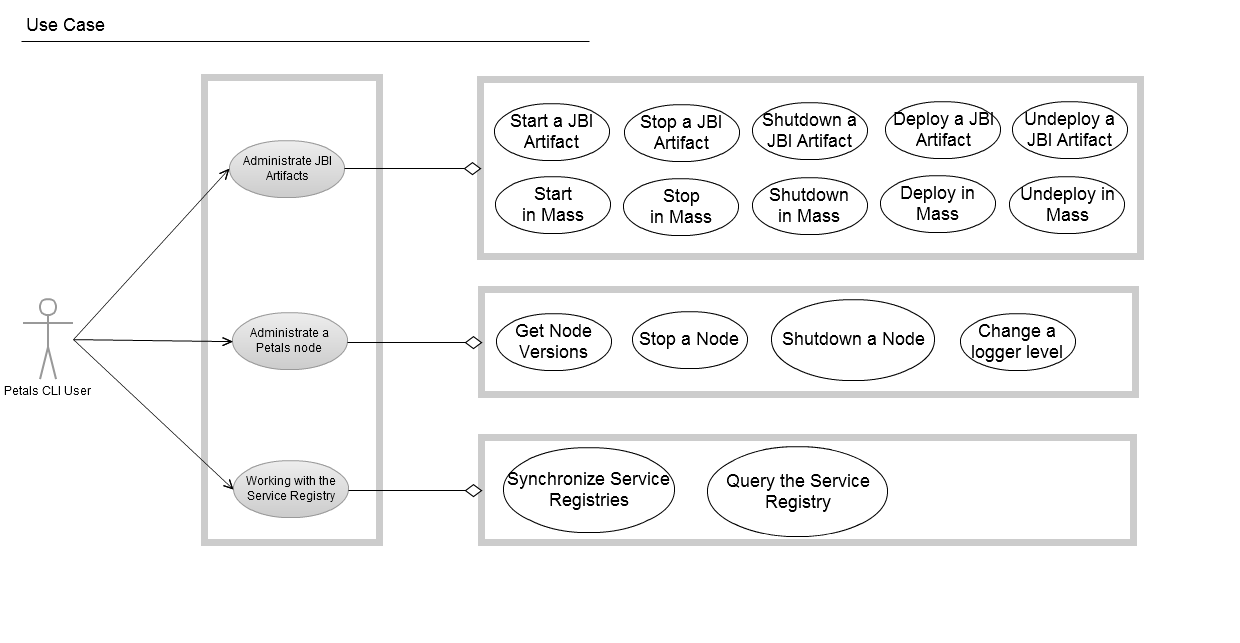
Use Cases
Usage of Petals CLI
A revoir (après discussion)
usage: Petals JMX Command Line Interface

[-d] [-y] [-h <host>] [-n <port>] [-u <user>] [-p <password>] [-H | -V | [--file ] <filename> | -c <command> <command-args> | -C]

-c,--command <command> Execute a command given on the command line.
-C,--console Enable the mode 'console'.
-d,--debug Print stack trace and debugging informations
--file <filename> Enable the script file execution. If filename is '-', commands are read from the stdin.
-H,--help Print this help message and exit.
-h,--host <host> remote petals ESB host name.
-n,--port <port> port number.
-p,--password <password> password.
-u,--user <user> username.
-V,--version Print the version number and exit.

To get help on a command, use the command 'help' on command-line: petals-cli.sh -c help <command>

Available commands:
- deploy: Deploy and start a JBI artifact in petals container.
- start: Start a JBI artifact or the container.
- stop: Stop a JBI artifact or the container.
- undeploy: Stop and uninstall or undeploy JBI artifacts.
- exit: Exit this shell.
- help: Display this help message or help for a specific command.
- list: List JBI artifacts name and current status.
- registry-sync: Force a registry synchronization
- registry-list: List the entries of the registry.
- version: Print version informations about petals container.
- show: Print informations about a JBI artifact.
- load: Load properties from files.
- print: Print a message.
- pwd: Print the working directory.
- set: Assign a value to the system property named key.

Which evolution would you like on Petals? Share it! http://www.petalslink.com/feedback
Petals CLI: the Basis
Petals CLI capabilities about script and shell usages
Interactive console
Launching Petals CLI with the following command line starts an interactive console with a prompt where the user can enter commands.
> ./petals-cli.sh -C

Type 'help' for help.
------------------------------------------------------------------------------
petals-cli>
This command is wrapped by another shell: petals-cli-console.sh. As it is not more usable than the option '-C' on command line, the wrapper script is removed. On Linux, a shell alias can be defined.
Execution of a Petals CLI command directly on the command line
Launching Petals CLI with the following command line executes the command specified on the command line.
> ./petals-cli.sh -c <command> <command-args>
Execution of a Petals script file
Launching Petals CLI with the following command line executes commands of a Petals script.
> ./petals-cli.sh <filename>
> ./petals-cli.sh --file <filename>
 | A Petals script is text file containing commands supported by Petals CLI. |
Execution of an inlined Petals script
Pas clair. Expliciter un peu mieux.
Launching Petals CLI with the following command line executes commands provided through the standard input ("stdin").
> cat <filename> | ./petals-cli.sh -
> cat <filename> | ./petals-cli.sh --file -
> ./petals-cli.sh - << EOF
<command1> <command1-args>
<command2> <command2-args>
EOF
> ./petals-cli.sh --file - << EOF
<command1> <command1-args>
<command2> <command2-args>
EOF
Getting help
Getting help on command line options and arguments
The help on command line options and arguments is available through the option '-H'. A text containing options, arguments and available commands is displayed according to the usage defined above.
> ./petals-cli.sh -H
Getting help on commands from the command line
The help on a command is available by using the command 'help'. A usage and a description of the command is displayed:
> ./petals-cli.sh -c help <command>

usage: <command> <command-arguments>

<command description>
>
where:
- <command> is the command for which we want to get help.
- <command-arguments> is the list of arguments for the command.
- <command-description is a description of the command.
Getting help on available commands and on a command in interactive mode
The list of available commands is available by using the command 'help' without argument.
The help on a command can be get using the command 'help'. A usage and a description of the command is displayed.
> ./petals-cli.sh -C

Type 'help' for help.
------------------------------------------------------------------------------
petals-cli> help

Available commands:
deploy Deploy and start a JBI artifact in petals container.
exit Exit this shell.
help Display this help message or help for a specific command.
...

For help on a specific command type:
help <command>

petals-cli> help <command>

usage: <command> <command-arguments>

<command description>
>
where:
- <command> is the command for which we want to get help.
- <command-arguments> is the list of arguments for the command.
- <command-description is a description of the command.
Getting the version of Petals CLI
To get the version of Petals CLI, the version of the JVM running Petals CLI, and its operating system, use the option '-V':
> ./petals-cli.sh -V
Petals JMX Command Line Interface 1.1.0-SNAPSHOT
Java(TM) SE Runtime Environment 1.6.0_26-b03
Linux 3.0.0-16-generic-pae
Return codes of Petals CLI
Return code on successful result
When there is no error about options and arguments on the command line, the return code of Petals CLI is 0.
Return code on error about options or arguments on the command line
When there is an error about options or arguments on the command line, the return code of Petals CLI is 1.
Return code on error about options and arguments of a command
When there is an error about options and arguments of a command, the return code of Petals CLI is 1.
Error management
Options et arguments parsing
When using the script mode or inlined mode, parsing errors (invalid options and/or arguments) result in an interruption of Petals CLI.
The right return code is then pushed back.
Error management of a command set on the command line
If an error occurs during the execution of a command set on the command line:
- The command is interrupted.
- Petals CLI is interrupted with the return code 2.
Error management of a command entered in interactive mode
If an error occurs during the execution of a command entered in interactive mode:
- The error message is displayed.
- Petals CLI is not interrupted, the user can enter other commands.
Error management of a command read from stdin or a file
If an error occurs during the execution of a flow of commands:
- The command that has thrown the error is interrupted.
- The return code of the command can be checked using the commands isParsingErrorReturned, isExecutionErrorReturned, isNoErrorReturned, the ternary conditional operator, and the attribute lastErrorCode.
> ./petals-cli.sh - << EOF
deploy <artifact-url>
isNoErrorReturned ? listartefacts : exit lastErrorCode
EOF
Note:
- The return values of command isParsingErrorReturned, isExecutionErrorReturned and isNoErrorReturned are re-intialized when invoking another command. Only the error of the last command execution can be checked.
- The attribute lastErrorCode is an argument of the command exit to return the return code of the last executed command.
Connection to a Petals node
Connection options from the command line
All the required parameters for a JMX connection must be configurable on the command line as options:
> ./petals-cli.sh -h <host> -n <port> -u <user> -p <password> -c <command>
> ./petals-cli.sh -h <host> -n <port> -u <user> -p <password> -C
Conected on <host1>:<port1> with <user1>
petals-cli>
Interacting with several Petals nodes without exiting Petals CLI
In interactive mode or script mode, we should be able to close a connection and open another one without leaving Petals CLI. This is done by commands 'connect' and 'disconnect'. If no arguments are set on command 'connect', default values are used. These default values are specified in a properties file located in the Petals CLI directory. The default values defined in this properties file are (localhost:7700, login=petals, pwd=petals).
> ./petals-cli.sh -C

Type 'help' for help.
------------------------------------------------------------------------------
petals-cli> connect <user1>:<password1>@<host1>:<port1>
Connected on <host1>:<port1> with '<user1>'
petals-cli> disconnect
petals-cli> connect
petals-cli> Would you like to connect to <default-user>:*****@<default-host>:<-default-port>? (y/n)
y
Connected on <default-host>:<-default-port> with '<default-user>'
Default connection
By default (if no argument or option is set):
- In 'console' mode, the connection is established on command 'connect' to the values defined in the properties file that define the preferences (localhost:7700 with credentials 'petals/petals').
> ./petals-cli.sh -C

Type 'help' for help.
------------------------------------------------------------------------------
petals-cli> connect
petals-cli> Would you like to connect to <default-user>:*****@<default-host>:<-default-port>? (y/n)
y
Connected on <default-host>:<-default-port> with '<default-user>'
- In 'command line' mode, if no argument or option is set, a connection is established to the values defined in the properties file that define the preferences (localhost:7700 with credentials 'petals/petals').
> ./petals-cli.sh -c stop

It's needed to stop easily a local container - In mode 'script', the connexion is establish on command 'connect' to <default-host>:<-default-port> with credentials '<default-user>/<default-pwd>'.
> ./petals-cli.sh - << EOF
connect
EOF
Security
For security reasons, a Petals CLI user may decide that there should be a default connection.
In that case, he may decide to delete the preference file, so that any user will have to type in the right information.
If the preference (properties file) does not exist, Petals CLI displays an error message.
> ./petals-cli.sh -C

Type 'help' for help.
------------------------------------------------------------------------------
petals-cli> connect
No default connection is available. Use 'help connect' for more information.
Another possibility is that the user allows to record a default host and port but not the credentials.
In that case, Petals CLI will ask the user to type in the credentials.
> ./petals-cli.sh -C

Type 'help' for help.
------------------------------------------------------------------------------
petals-cli> connect
petals-cli> Would you like to connect to <default-host>:<-default-port>? (y/n)
y
petals-cli> Username: wrong-username
petals-cli> Password: right-pwd
Invalid credentials.
petals-cli> Retry? (y/n)
y

petals-cli> Username: right-username
petals-cli> Password: wrong-pwd
Invalid credentials.
petals-cli> Retry? (y/n)
y

petals-cli> Username: right-username
petals-cli> Password: right-pwd
Connected on <default-host>:<-default-port> with '<right-username>'
Petals CLI commands
Working with JBI artifacts
Installation/Deployment and start of an artifact in one command
Petals CLI is able to install/deploy and start a JBI artifact without distinction between shared-library, component and service assembly using the following command:
deploy <artifact-file> [<configuration-file> | <configuration-properties>]
where:
- <artifact-file> is the local file name or the URL of the artifact to install or deploy and start
- <configuration-file> is the local file name or the URL of the properties file used to configure the artifact. This argument is used only if the artifact is a component. It has no sense for other artifacts. This argument is exclusive with <configuration-properties>.
- <configuration-properties> is a list of '<property-name>=<property-value>', separated by a space, where <property-name> is the name of the property to configure with <property-value>. This argument is used only if the artifact is a component. It has no sense for other artifacts. This argument is exclusive with <configuration-file>.
Installation/Deployment of an artifact located into a Maven repository
Petals CLI is able to install/deploy and start an JBI artifact located into a Maven repository using the following command:
deploy <maven-artifact> [<configuration-file> | <configuration-properties>]
where:
- <maven-artifact> is the Maven identifiers of the artifact to install: group-id:artifact-id:version[:classifier]. If required, the Maven repository can be defined in the Maven configuration file ($HOME/.m2/settings.xml)
- <configuration-file> is the local file name or the URL of the properties file used to configure the artifact. This argument is used only if the artifact is a component. It has no sense for other artifacts. This argument is exclusive with <configuration-properties>.
- <configuration-properties> is a list of '<property-name>=<property-value>', separated by space, where <property-name> is the name of the property to configure with <property-value>. This argument is used only if the artifact is a component. It has no sense for other artifacts. This argument is exclusive with <configuration-file>.
Installation/Deployment and start in mass
To deploy several artifacts in one command, just put them in a local directory and execute the command 'deploy':
> ./petals-cli.sh -y - << EOF
deploy /tmp
EOF
> ./petals-cli.sh -C

Type 'help' for help.
------------------------------------------------------------------------------
petals-cli> deploy /tmp
Are you sure you want to deploy all artifacts of directory '/tmp'? (Y/n)
If the argument <artifact-file> of the command deploy is a local directory, all artifacts of the directory are deployed. In this case, a confirmation is expected, except if the flag 'yes' is set on the command line. A confirmation message is displayed in the mode 'console', except if the flag 'yes' is set on the command line.
Starting an artifact
An artifact can be started using the command 'start' with the argument 'artifact':
> ./petals-cli.sh -c start artifact [ <artifact-file> | [<artifact-type> <artifact-id>] ]
where:
- <artifact-file> is the local file name or the URL of the artifact to start.
- <artifact-type> is the nature (SL, component, SA) of the artifact to start.
- <artifact-id> is the JBI identifier of the artifact to start.
Stopping an artifact
An artifact can be stopped using the command 'stop' with the argument 'artifact':
> ./petals-cli.sh -c stop artifact [ <artifact-file> | [<artifact-type> <artifact-id>] ]
where:
- <artifact-file> is the local file name or the URL of the artifact to stop.
- <artifact-type> is the nature (SL, component, SA) of the artifact to stop.
- <artifact-id> is the JBI identifier of the artifact to stop.
Uninstallation/Undeployment and stop of an artifact in one command
Petals CLI is able to stop and uninstall/undeploy a JBI artifact without distinction between shared-library, component and service assembly using the following command:
undeploy [ <artifact-file> | [<artifact-type> <artifact-id>] ]
where:
- <artifact-file> is the local file name or the URL of the artifact to undeploy.
- <artifact-type> is the nature (SL, component, SA) of the artifact to undeploy.
- <artifact-id> is the JBI identifier of the artifact to undeploy.
 | Add feature to remove artifact by name |
Uninstallation/Undeployment and stop in mass
To undeploy several artifacts in one command, just put them in a local directory and execute the command 'undeploy':
> ./petals-cli.sh -y - << EOF
undeploy
EOF
> ./petals-cli.sh -C

Type 'help' for help.
------------------------------------------------------------------------------
petals-cli> undeploy
Are you sure you want to undeploy all artifacts of the Petals node (Y/n) ?
If no argument is set on command undeploy, all artifacts are undeployed. In this case a confirmation is expected, except if the flag 'yes' is set on the command line. A confirmation message is displayed in the mode 'console', except is the flag 'yes' is set on the command line.
Showing installed JBI artefacts
All installed JBI artefacts can be listed using the command 'list [<artifact-pattern> [artifact-type]]':
> ./petals-cli.sh -c list
petals-bc-soap Started BC
petals-se-bpel Started SE
soap-consume-provide Started SA
su-SOAP-EchoService-consume Started SU
su-SOAP-EchoService-provide Started SU
where:
- <artifact-pattern> is an optional RegExp pattern to filter the content of the returned list. All the returned JBI artifacts must have a JBI identifier matching the pattern. If no pattern is defined, all the installed artifacts are returned.
- <artifact-type> is one of the following values: SL, BC, SE, SA, SU, used to restrict the returned list.
For each artifact, the command displays (caution to the padding):
- Its JBI identifier.
- Its current status.
- Its type (SL, BC, SE, SA, SU).
Getting information on an artifact
Information about a JBI artifact can be got by using the command 'show':
> ./petals-cli.sh -c show [-e] [ <artifact-file> | [<artifact-type> <artifact-id>] ]
where:
- <artifact-file> is the local file name or the URL of the artifact to show.
- <artifact-type> is the nature (SL, component, SA) of the artifact to show.
- <artifact-id> is the JBI identifier of the artifact to show.
The option '-e' displays extended information.
Displayed information includes:
- For a shared library:
- Its JBI identifier
- Its version, if available
- Extended information:
- List of embedded libraries
- For a component (BC or SE):
- Its JBI identifier
- Its type: binding component or service engine
- Its version, if available
- Its state (loaded, installed, started, stopped, shutdown)
- Extended information:
- List of embedded libraries of the boostrap classpath
- List of embedded libraries of the runtime classpath
- For a service assembly:
- Its JBI identifier
- Its version, if available
- Its state (deployed, started, stopped, shutdown)
- List of embedded service-units (displayed using their JBI identifiers)
- Extended information:
- For each service unit:
- Its JBI identifier
- Its version, if available
- Its target component ((displayed using its JBI identifier)
- For a service unit:
- Its JBI identifier
- Its version, if available
- Its target component ((displayed using its JBI identifier)
Command 'exit'
Exit the mode 'console'
To exit the mode 'console', use the command 'exit'. If a number is set as argument, it is used as return code otherwise, the return code 0 is used:
> ./petals-cli.sh -C

Type 'help' for help.
------------------------------------------------------------------------------
petals-cli> exit
> echo $?
0
> ./petals-cli.sh -C

Type 'help' for help.
------------------------------------------------------------------------------
petals-cli> exit 1
> echo $?
1
Interrupting a flow of commands
A flow of commands can be interrupted by using the command 'exit'. If a number is set as argument, it is used as return code. The argument 'lastErrorCode' is used as return code value of the last executed command. Otherwise the return code 0 is returned to the shell:
> ./petals-cli.sh -y - << EOF
deploy /tmp/my-artifact.zip
exit lastErrorCode
EOF
Ending a flow of commands
When the end of a flow of commands is reached, if the last command is not 'exit', the command 'exit lastErrorCode' is implicitly executed:
> ./petals-cli.sh -y - << EOF
deploy /tmp/my-artifact.zip
EOF
echo $?
0
Working with the Container
Getting the versions of the Petals node
To get the version of Petals node, the version of the JVM running Petals node, and its operating system, use the command 'version':
> ./petals-cli.sh -c version
Petals JBI Container 3.1.4-SNAPSHOT
Java(TM) SE Runtime Environment 1.6.0_26-b03
Linux 3.0.0-16-generic-pae
Stopping the container
The container can be stopped using the command 'stop' with the argument 'container':
> ./petals-cli.sh -c stop container
Shutdowning the container
The container can be shutdowned by using the command 'stop' with the argument 'container' and the parameter '--shutdown':
> ./petals-cli.sh -c stop container --shutdown
Are you sure you want to shutdown the container (Y/n) ?
A confirmation is expected, except if the flag 'yes' is set on the command line. A confirmation message is displayed in the mode 'console', except is the flag 'yes' is set on the command line.
Working with the Service Registry
Synchronizing the registry
A synchronization of the registry on all nodes of the Petals topology can be done with the command 'registry-sync':
> ./petals-cli.sh -c registry-sync
Synchronization is done
The response message is displayed in 'console' mode only.
Showing the registry's full content
The full content of the registry can be dumped by using the command 'registry-list':
./petals-cli.sh -c registry-list
Endpoints:
<endpoint-name-1>: <endpoint-1-characteristics>
<endpoint-name-2>: <endpoint-2-characteristics>
Services:
<service-name-1>:
<endpoints-list>
<service-name-2>:
<endpoints-list>
Interfaces:
<interface-name-1>:
<endpoints-list>
<interface-name-2>:
<endpoints-list>
where:
- <endpoint-name-x> is an endpoint name.
- <endpoint-x-characteristics> is the attributes of the endpoint, separated by comma: container identifier, component identifier, endpoint type.
- <service-name-x> is a service name.
- <interface-name-x> is an interface name.
- <endpoints-list> is the list of endpoint name implementing the interface or service.
| VZ: pas très clair.
|
Filtering the registry's full content by endpoint
The content of the registry related to an endpoint can be dumped by using the command 'registry-list':
./petals-cli.sh -c registry-list endpoint <endpoint-name>
Endpoints:
<endpoint-name>: <endpoint-characteristics>
Services:
<service-name-1>:
<endpoint-name>
<service-name-2>:
<endpoint-name>
Interfaces:
<interface-name-1>:
<endpoint-name>
<interface-name-2>:
<endpoint-name>
where:
- <endpoint-name> is the endpoint name used as filter.
- <endpoint-characteristics> is the attributes of the endpoint, separated by comma: container identifier, component identifier, endpoint type.
- <service-name-x> is the services associated to the specified endpoint.
- <interface-name-x> is the interfaces name associated to the specified endpoint.
Filtering the registry's full content by service
The content of the registry related to a service can be dumped by using the command 'registry-list':
./petals-cli.sh -c registry-list service <service-name>
Endpoints:
<endpoint-name-1>: <endpoint-1-characteristics>
<endpoint-name-2>: <endpoint-2-characteristics>
Services:
<service-name>:
<endpoints-list>
Interfaces:
<interface-name-1>:
<endpoints-list>
<interface-name-2>:
<endpoints-list>
where:
- <endpoint-name-x> are the endpoint names implementing the service.
- <endpoint-x-characteristics> is the attributes of the endpoint, separated by comma: container identifier, component identifier, endpoint type.
- <service-name> is the service full-name used as filter.
- <interface-name-x> are the interfaces of the service.
- <endpoints-list> is the list of endpoint name implementing the interface or service.
Filtering the registry's full content by interface
The content of the registry related to an interface can be dumped by using the command 'registry-list':
./petals-cli.sh -c registry-list interface <interface-name>
Endpoints:
<endpoint-name-1>: <endpoint-1-characteristics>
<endpoint-name-2>: <endpoint-2-characteristics>
Services:
<service-name-x>:
<endpoints-list>
Interfaces:
<interface-name>:
<endpoints-list>
where:
- <endpoint-name-x> are the endpoint names implementing the interface.
- <endpoint-x-characteristics> is the attributes of the endpoint, separated by comma: container identifier, component identifier, endpoint type.
- <service-name-x> are the service names implementing the interface.
- <interface-name> is the interface full-name used as filter.
- <endpoints-list> is the list of endpoint name implementing the interface or service.
| Même remarque que plus haut sur la clarté de la réponse. |
| Serait-il intéressant de pouvoir faire du requêtage ? registry-list query srv=toto&itf=getClient registry-list query itf=get%Client % = wildcard |